Notes in a text file, roused into pictures, narration and film.
Acue is a suite of three tools. You write a story in a plain text file, and they turn it into pictures, music, narration and short clips, generated by AI models on machines you own, with nothing sent to the cloud. Each result is kept as one .acue book. Your own photos make a book too: a holiday, a birthday party, a day out.
Sovereign, private AI
Everything Acue makes is made on machines you own: the graphics card in your desktop and, if you have one, an AI server in your home or office. There is no cloud account, nothing to sign up for, and nothing is uploaded. Your stories, your photos and your voice recordings stay with you.
The models are openly available ones, such as Stable Audio, ACE-Step, Qwen, Kokoro, Flux Klein and Z-Image, downloaded once and run on your own hardware.
Photos lose their GPS position, camera and owner before they go into a book, and their captions are drafted only by a server on your own network.
Each book records which models made it and with which settings, so you know exactly what made it and can make it again.
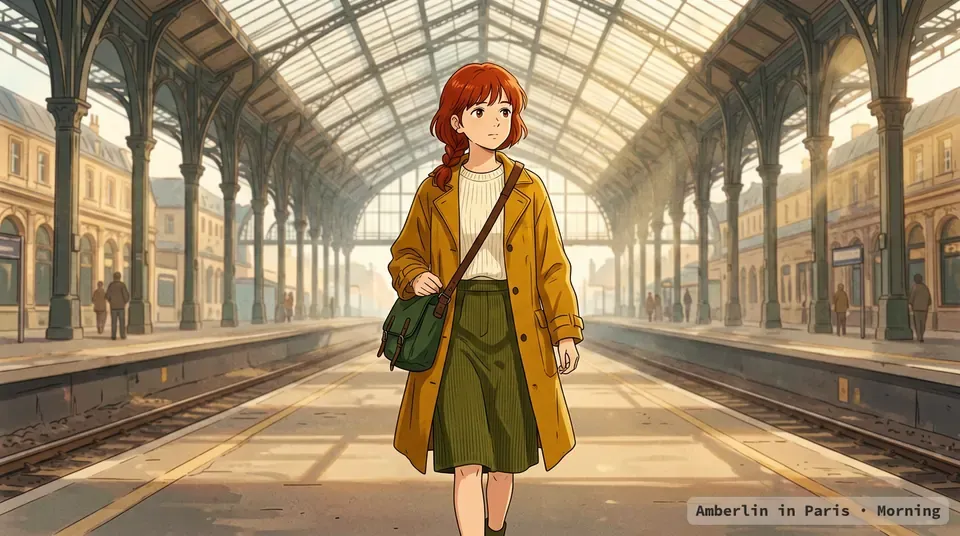
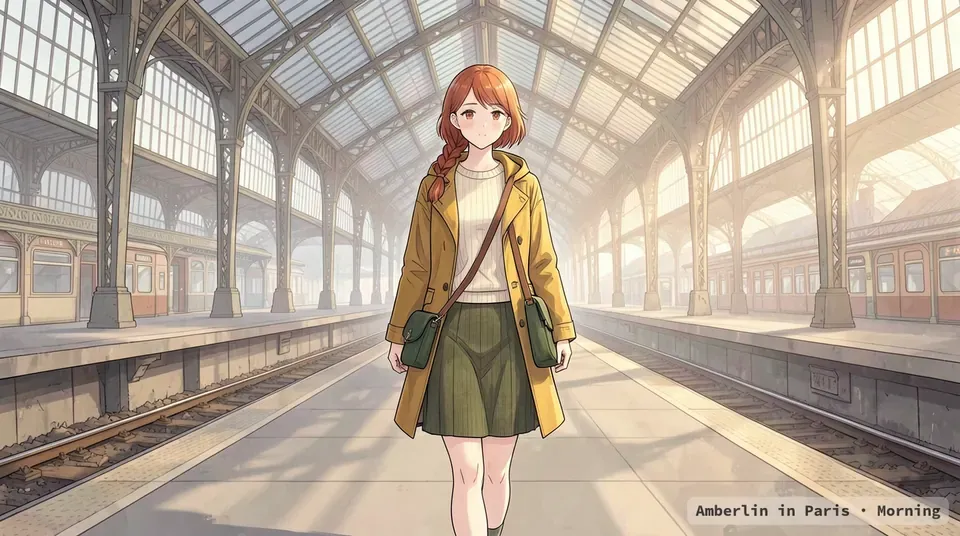
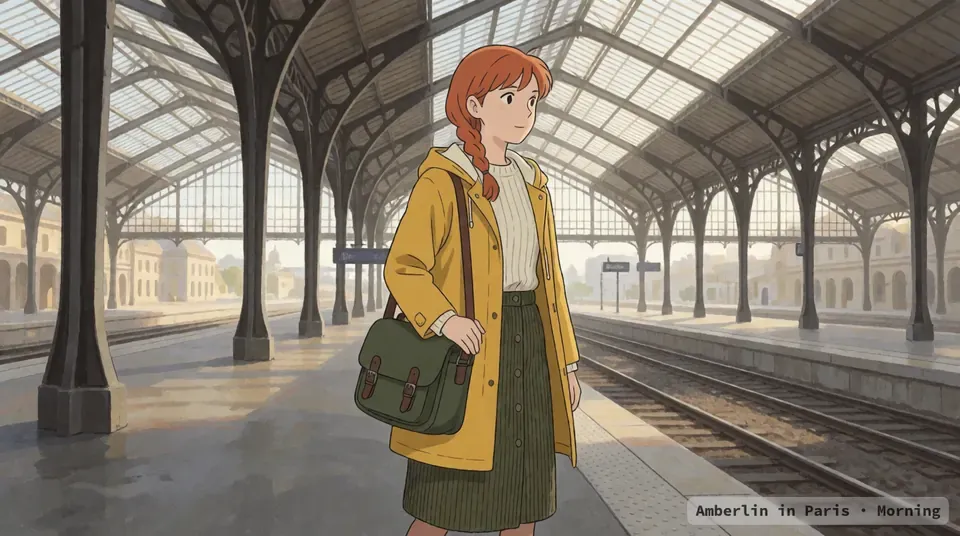
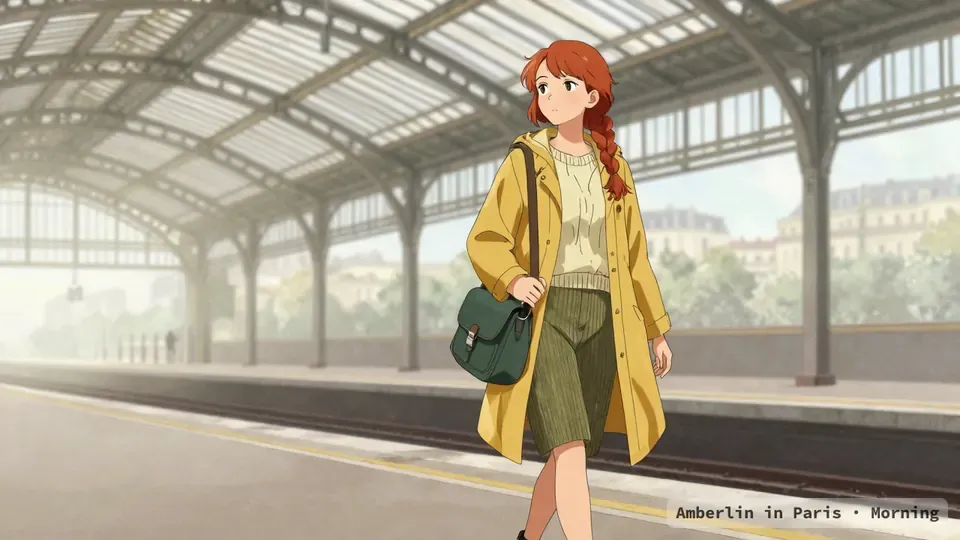
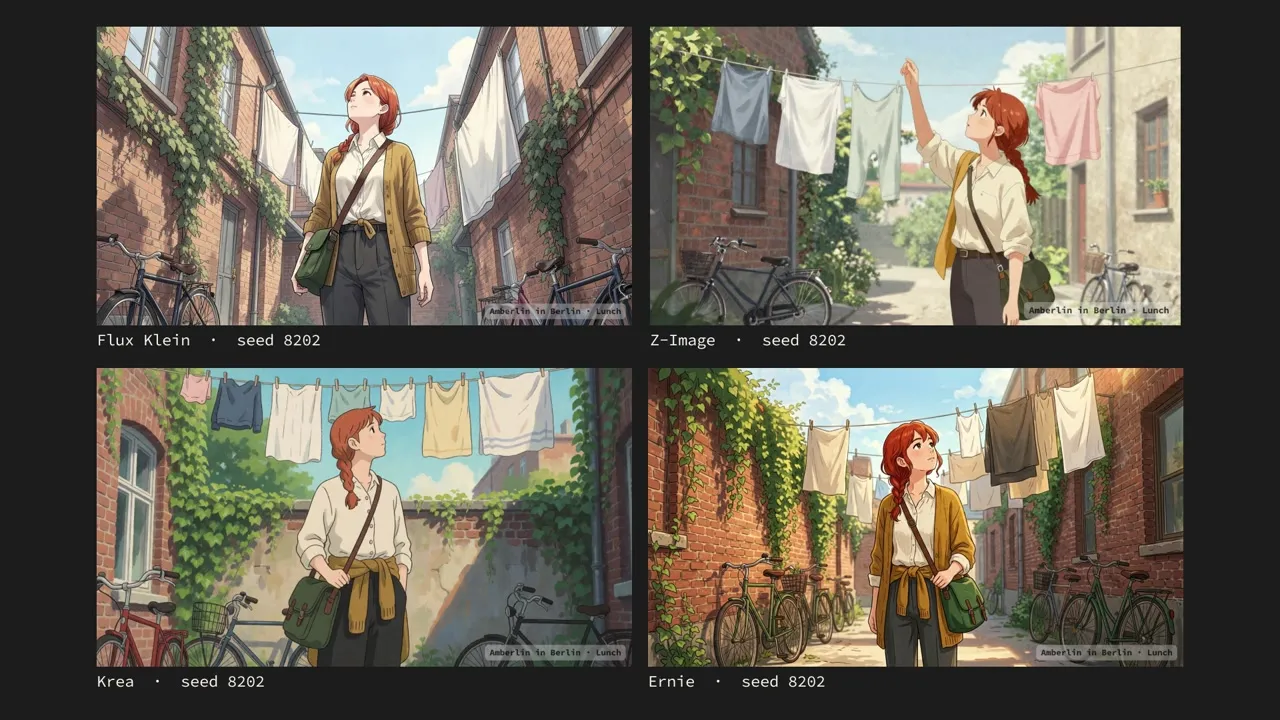
One of the example books, a day in Paris in 96 panels, went to four image models with the same story files, the same seeds and the same size. The gallery puts their pictures side by side, panel by panel, with each book's music: a comparison of the prompts, before anyone tunes them to one model.
The first panel, as each model drew it: wide shot, she walks the length of a platform under an iron and glass roof, satchel on her shoulder.
A text file, and what it became
A story file is plain text. A line that starts with two dashes says what to do with the words around it: --style is the look and the cast, and holds for the whole file; --scene is the place and the hour; each --image line is one picture.
The top of example.txt, shortened
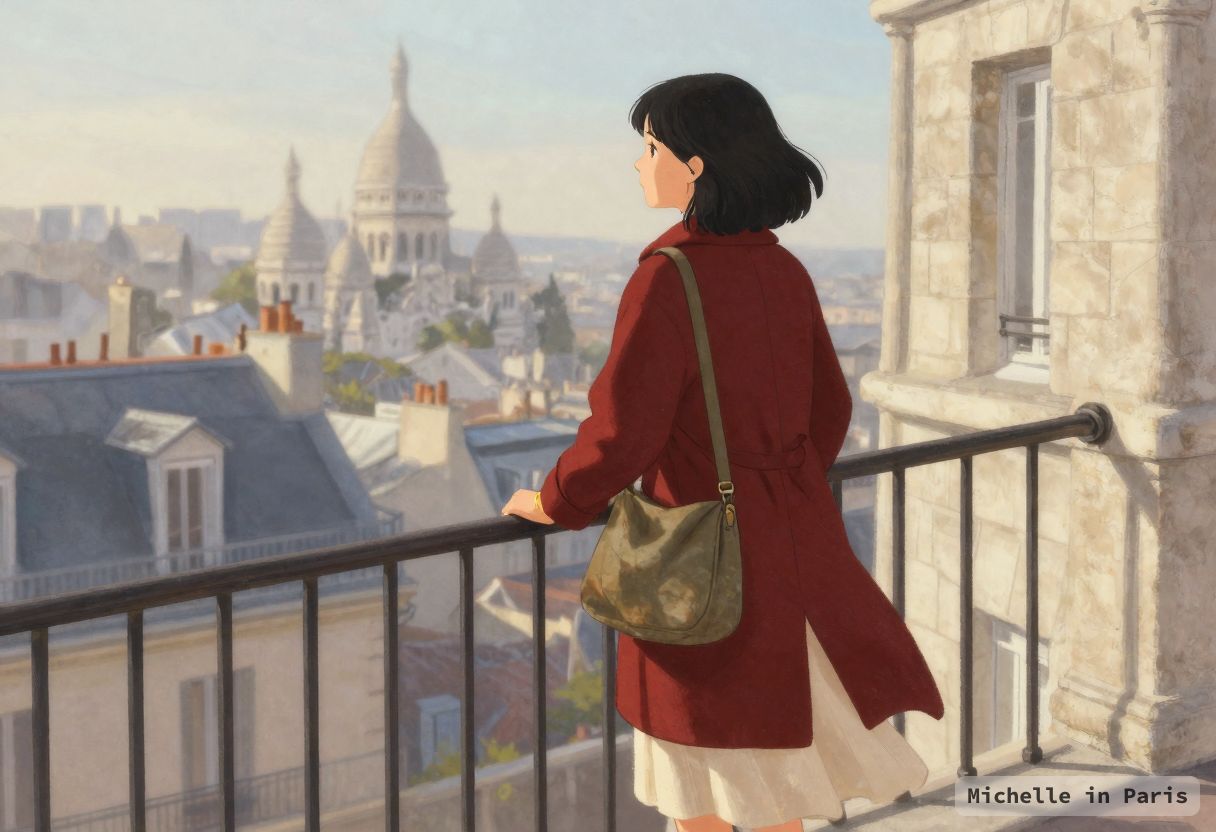
--title Michelle in Paris--seed 363--width 1216--height 832--stylesingle full-bleed illustration, soft anime style, clean linework, warmpainterly light, muted film palette, a woman in her late twenties, chin-lengthblack bob, dark red wool coat, cream dress, knee length, thin gold wedding band, a fadedolive canvas bag on a long strap--scene Montmartre in early spring, cool morning light, pale stone, shuttered windows--image wide shot from behind, she stands at the top of a long stone staircase, one hand on the iron rail, rooftops below
The first of its 56 --image lines, drawn by Z-Image in Forge Neo. The book is Michelle in Paris.
Each picture's prompt is put together from the look, the line and the scene, and each line is one request: 56 lines, 56 pictures. Every directive is on the Directives page.
Your own photos
A folder of camera shots becomes a book: the summer holiday, a birthday party, a wedding, a walk through a city. No pictures are drawn. acue puts the photos in the order they were taken, makes a chapter for each day, and gives each chapter music in a mood: holiday, family, travel or calm. You add a caption to the photos you want to say something about, and a place where it matters. Out comes a book with its soundtrack, a video to share with the family, and, with acue --print, a book to print.
On Linux Mint, Pinax does it from the folder you are looking at: Make a book…, choose the photos, write the captions, and the finished book opens in its reader. The photos stay on your computer, and in the book each one is saved with no metadata at all, so no GPS position, camera or owner goes with it. Music and drafted captions are optional; without them it is still a book. The Commands page shows how.
The book
Every story we make ends as one .acue file. It holds the whole book: the pictures in order, the narration or the soundtrack, any short clips, the story files it was made from, and what each picture is: its title, description, copyright, licence, keywords and location.
A book can be a story to read, a story read aloud with its pictures timed to the voice, a comic of pictures alone, or a picture book with music. Its music can be a short song for each chapter, sung in the book's language, and a voice can narrate each scene while the music eases down under it. The .acue keeps the narration with its subtitles. The Commands page shows both.
Our example books follow Amberlin through a day in five cities: Paris, Berlin, Rome, Kyiv and London. Each day is four chapters (morning, lunch, afternoon and evening), each with its panels and its soundtrack. In London she arrives at St Pancras, visits the British Library, walks through an East London flower market, meets a mudlark on the South Bank and ends the day on Primrose Hill. Emma, a Kokoro voice, narrates it, and its songs are in English. Amberlin sings Paris in French, Berlin in German, Rome in Italian and Kyiv in Ukrainian.
An .acue file is a ZIP with a plain-text manifest, book.toml, much like a comic book archive. A book repacked by WinZip, Windows or macOS still opens, and each is saved with a .sha256 checksum beside it. Pinax, the image viewer of Amber Linux, opens a book and turns its pictures as pages. How the book format was designed is on hyperquader.com.
How we work
Acue is two programs and the format they share. acue is where we try image models: its profiles switch Forge Neo from one model to another quickly and the same way every time, so one story file drawn by several models makes a fair comparison in a proof. Once a proof has picked the model, acue studio takes over, against a fixed stack of servers: we use it to open the books, fine-tune a single prompt, and iterate on a story file quickly, since every picture and recording is there to see and hear as soon as it comes back.
acue
The book maker, in the terminal
It starts Forge Neo for pictures and Stable Audio for music on your graphics card, runs a folder of story files through them, and writes one .acue book per story: the pictures and an original soundtrack, with an mp4 of the pictures cut to the music. The soundtrack can be songs, and a voice can narrate the book. It makes a book of your own photos too, and prints one. A PDF proof lays two to four books side by side, to see which model drew a story best.
acue studio
The server and its dashboard
Drop a story file on its page in your browser, and it comes back as a story in chapters from a language model, as pictures, as narration in a Kokoro voice with the pictures timed to it, or as short clips from an animator. ffmpeg turns a narration into a video. Every result downloads as an .acue book or a PDF.
amber-acue
The format, and your editor
The parser both programs use, so a file means the same to each, and the .acue book format they both write. Its language server, acue-lsp, works with VS Code, Neovim and Helix: it completes the directives, explains each one on hover, and marks a wrong line as you type. Other programs can use it too, as an Odin library or as a C library with one header.
Where the models run
Acue does no inference of its own. The pictures, music, narration and clips are made by open AI models, in servers you run yourself.
The acue book maker uses servers on its own machine, on that machine's graphics card, and starts and stops them for you: Forge Neo, a web interface and server for image models, draws the pictures (the models in the gallery, such as Z-Image and Flux Klein, run inside it), and Stable Audio, an open music model, writes each book's soundtrack. For songs it starts ACE-Step the same way. Its Info pane shows what the drivers and the card are doing.
For song lyrics, photo captions and narration drafts, acue asks a chat model, and a speech server speaks the narration. Ours are Qwen and Kokoro on our own server. Both are optional, named in acue's servers.toml.
acue studio connects to servers wherever they run, often on another machine. We use NVIDIA DGX Spark stations running a Docker stack of SGLang servers for text, picture, speech and video generation, and speech recognition, with a Kokoro voice for narration. acue studio itself listens on this machine only, at 127.0.0.1:5193.
You need no account and no cloud service.
Amberlin in Berlin · proof: Flux Klein, Z-Image, Krea, Ernie. The player is YouTube's own and loads when you press play. Watch on YouTube
Watch finished books in the Acue playlist on YouTube.
On your desktop
A book can also carry desktop themes for Amber Linux, in a themes/ folder that readers never open. Through the day a theme changes the desktop's colours and background to the book's four times of day, so you can use Acue to prompt your wallpapers and let your Amber Linux desktop change with the time of day. --ratio wallpaper draws a picture at 16:9 and upscales it to exactly 3840 × 2160 for this. Themes from books are described on amberlinux.org.
Setup
acue and acue studio are Debian packages in the Amber Linux archive, for Linux Mint 22 and later. Add the archive once, as the Amber Linux packages page shows, then install either or both:
Story files get completion, an explanation of each directive on hover, and a warning on every line the parser refuses, from the language server, acue-lsp. The editor support is BSD-3-Clause.
acue-lsp (Linux amd64, 0.2 MB): the language server. Put it on your PATH.SHA-256 39820d8d6879d110cc68133965c9c8dd2ececf7a147f0b1cad9dc522734b33ce·.sha256
The VS Code extension (0.7 MB): install it with Extensions: Install from VSIX. It starts acue-lsp.SHA-256 ba91838753abbab0a3727bcd0091b3cc544cf24f28ebc0b5286222680dbbd4c0·.sha256
Neovim files (Neovim 0.11 or later): the plugin, the syntax and the language server's config, to copy into your config folder.SHA-256 5d6b0f54437010f825df2b5e8043c439aa34197fc685b68ff7f30c85ca72d377·.sha256
The TextMate grammar: syntax colours for Helix, Sublime Text, Zed and other editors that read TextMate grammars.SHA-256 66bc648bc5e53e559f3440d5b51716f70ce802932bdba7f4ec129be9f74f639b·.sha256
The library
amber-acue, the parser both programs use, is an Odin library and a C library. A program in another language links the static library or loads the shared one, and includes its one header. Through it a program parses story files and writes .acue books. Both are BSD-3-Clause.
amber-acue is written in Odin. To prove that an Odin library can serve other languages through C, we wrote the same small program in Go and in Python: acue-watcher-go links the static library through cgo, and acue-watcher-python loads the shared one with ctypes. Each turns a story file dropped into a folder into a book, and is a start for anyone who wants to build on it.
The Odin library (0.1 MB): the acue collection with its packages, the API and a cheat sheet.SHA-256 180818a203941292556e8f1d539490e01e6720e4b1d772fd7ff48103f9987e02·.sha256
The C library (Linux amd64, 0.4 MB): amber_acue.h, the static libamber_acue.a and the shared libamber_acue.so. Build with cc -Iinclude your.c lib/libamber_acue.a -lm.SHA-256 51628116325af41d7a7c0c801d701e8fbc12ec2690faa1e3f3645eeb44800da8·.sha256
Checking a download
Every file here shows its SHA-256, and its checksum file sits beside it at the same address, with .sha256 added. On Linux Mint, download both into one folder, open a terminal there, and check the file:
wget https://acue.media/downloads/acue.vsix
wget https://acue.media/downloads/acue.vsix.sha256
sha256sum -c acue.vsix.sha256
acue.vsix: OK
On macOS the command is shasum -a 256 -c. On Windows, Get-FileHash acue.vsix in PowerShell shows the same value in capitals.
Read more
The guide (PDF, 50 pages, 0.7 MB): the acue book maker from the first image to a finished book, and how to write a picture story and its soundtrack.SHA-256 82329b7185b57a68819cecd3287b76c63ec36a4cfc9babc2235c5797dcf1ea82·.sha256
A sample book (.acue, 21 MB): Michelle in Paris, one day in four chapters of four pictures, drawn by Z-Image, with two example desktop themes inside.SHA-256 8dab989cfdd535553531ec0ea6ae735b2ab9846b8e030b2e69296a0216a56d3e·.sha256
An example proof (PDF, 24 pages, 14 MB): the same day drawn by four models, Z-Image, Ernie, Flux Klein and Krea, side by side, one panel to a page.SHA-256 3d219ae4abb983bfebc02f83e8b795fc52e566663603823d159ae550849f935a·.sha256